Payroll Subsidiary Assignment at Multi-EIN Companies
We've released a new process for changing default payroll subsidiary assignments.
To help prevent downstream discrepancies in employee data, we’ve released an update to how payroll companies (also known as payroll subsidiaries) are assigned at multi-EIN organizations.
Past Behavior
Previously, when a new employee’s profile was created at a multi-EIN organization via any method other than onboarding (where payroll company is assigned by the onboarder), the employee would automatically be assigned to the organization’s default payroll company. (The default payroll company is the first one that was configured for the organization.)
The assigned payroll company could be changed, but only until a pay group was assigned. Once the pay group was assigned, the payroll company couldn’t be changed without contacting Namely. Additionally, if any org units or classes were assigned, those assignments wouldn’t be automatically deleted or end-dated when the payroll company was updated. This could result in discrepancies in employee data.
New Behavior
Moving forward, when an employee’s profile is created (again, via any method other than onboarding), the default payroll company will still be assigned. However, should you need to change that payroll company, instead of editing the assignment, you’ll be required to remove it altogether.
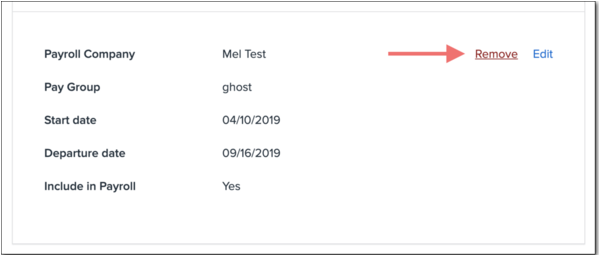
Clicking the new Remove button next to the payroll company will surface a modal informing the user that removing the company assignment will also delete any org unit or class assignments. This will prevent erroneous records from propagating across your site.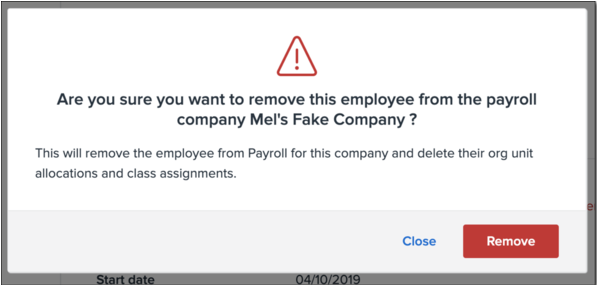
You won't be able to remove a payroll company if the employee has already been paid through it. Namely will also prevent you from removing a payroll company if it is the only one currently assigned to the employee, as Payroll Company is a required field for a worker’s employment records. If you attempt to remove a payroll company before a second has been assigned, you’ll receive the following message: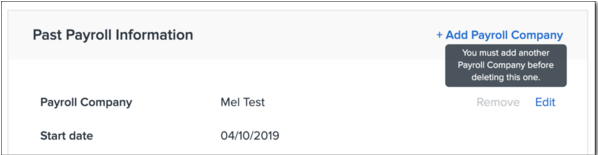
Once you have assigned a second payroll company, you’ll be able to remove the first.