Global Disable Direct Deposit Button
We've released a new button in step 2 of payroll processing that allows you to disable direct deposit for all employees included in the pay cycle.
Sometimes when you're processing a company-wide additional payment—like a holiday or earnings bonus—you want to distribute the funds in a physical check instead of direct depositing the funds.
To save you from having to individually turn off direct deposit for each employee in your pay cycle, you can now disable direct deposit for all employees in a pay cycle with just a single button click!
To disable direct deposit for all employees in a pay cycle:
-
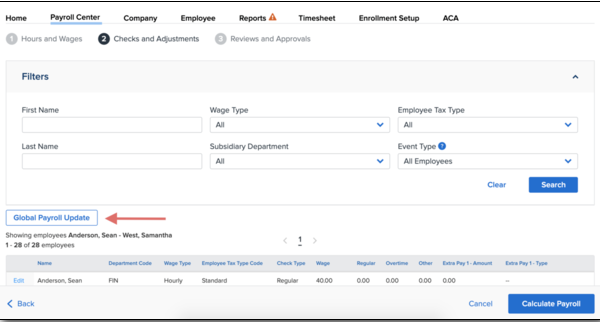
In step 2 of payroll processing, click Global Payroll Update.
-
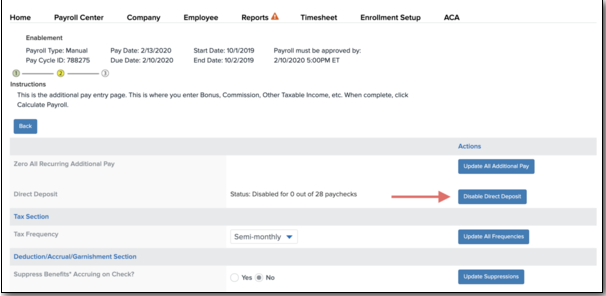
Click Disable Direct Deposit.
-
Click Back to return to step 2.
Remember, if you use Namely for check-printing, you'll still need to stop Namely checking printing to print in-house. You can find more information on stopping check printing, as well as disabling direct deposit for an individual employee, in our In-House Check Printing article.