Where do I set up Single Sign On?
SAML exchanges authentication and authorization information between parties to allow single sign-on (SSO). Namely partners with Okta for SSO, but you can use any SAML.
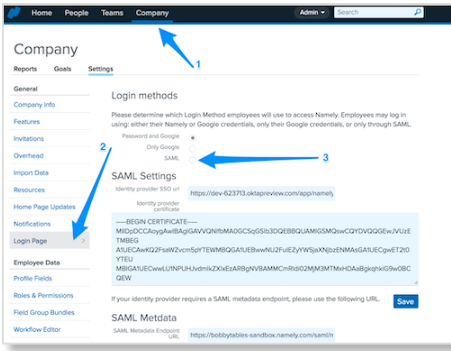
To enable SSO to Namely:
-
Select the Enable SAML checkbox.
-
Enter the Identity provider SSO URL.
-
Enter the Identity provider certificate.
TIP:
When downloading the certificate from your provider, download it as a PEM (.pem) file.
-
Click Save.
-
This information comes from the Identity Provider.
-
The IdP will provide the SSO URL and Certificate for an HR Admin to add to their SAML Settings.
-
The "SAML" check box can be checked or unchecked at any time and will not erase the settings.