How do I sign up for electronic delivery of my payroll documents (e.g., W-2 and 1095)?
Electronic delivery of tax forms allows you to opt-out of paper copies of your annual tax documents (e.g., W-2 and 1095.)
If you would like to sign up for electronic delivery of your payroll forms:
-
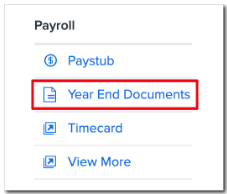
Click Year End Documents on the Namely homepage.
-
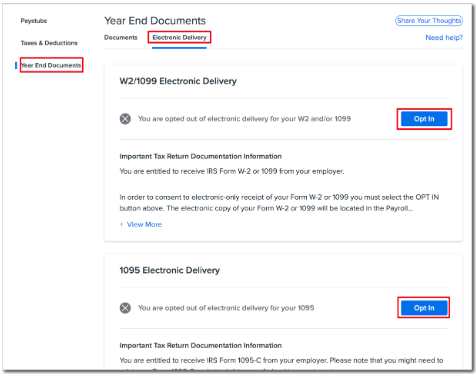
Click Electronic Delivery.
-
Review the information on the electronic consent form and click Opt-in to receive electronic delivery only, or Opt-out to receive a paper copy.
TIP:
-
Regardless of whether you select Yes or No, you will always have access to the PDF version of your tax forms on your Namely profile.
-
If you decline electronic consent or do not access the consent form to make a selection, your employer is responsible for mailing paper copies of your tax forms to the address in your Namely profile.