How can I make a one time edit to an employee's deductions?
Namely recommends making one-time updates to employee deductions from within the Pay Cycle. Edits to deductions can be made from the employee's profile in Namely Payroll, but doing so requires the deduction to be edited back to its original amount after payroll is processed.
The best practice is to update the deduction on Step Two of payroll. Click Edit next to the employee's name and scroll to Deductions.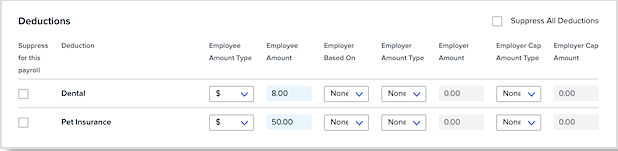
Any edits made to the employee's deductions will only be reflected on the existing pay cycle.
Note: If an employee does not currently have a deduction in their profile, a deduction must be added in the employee's profile (best practice with $0 for Employee and Employer contributions if not recurring), then delete and re-add that Employee to the cycle and follow the steps mentioned above.
TIP:
You can also make deduction edits for multiple employees at once using the Pay Cycle Deduction Imports tool.