Entering Federal Withholding Information on Employee Profile
To change the federal withholding information for an employee, you must access the Deductions page of the payroll profile for the employee.
First, you must view the Payroll Profile, click the Employee Maintenance list from the CertiPay home page, and select Payroll Profile. The General Info page is displayed.
To find an employee, click the Find Employee link to open the Employee Lookup window. Locate the employee, and double-click the name to open it on the Payroll Profile page.
Click the Deductions tab, highlight the Federal Withholding deduction.
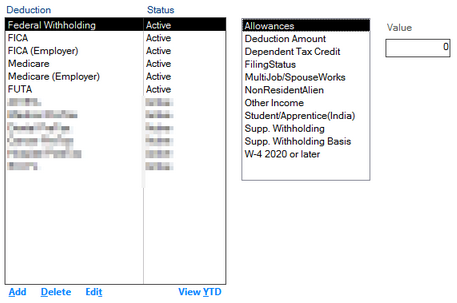
Update the values for the following deduction attributes:
When finished, click Close.
Fill in the available attributes based on the fields on the W4 that the employee has provided to you:
Allowances: This only applies to W4’s prior to 2020
Deduction Amount
Dependent Tax Credit
Filing States: Single, Married, Head of Household. If it is not indicated: Single
Multijob/Spouse Works: If there is a checkmark in step 2B, select yes, If not, No
Nonresident Alien: Yes or no
Other Income: If there is additional income that is being recorded
Supp. Withholding: Any Additional withholding tax that will be withheld from the employee’s check
Supp. Withholding basis: Amount or Percentage
W-4 2020 or later: Yes or no
If you have any questions about filing out the above information, please know that Certipay cannot advise what should be input in these attributes but you can view the 2020 or Later W-4 Form Federal Withholding Set Up document for more clarification on what goes in each attribute.